You can join to the Telegram chat for discussion.
New version of Red Expert 2024.09 is available.
Added:
- fbclient libraries for RDB 3, 4 and 5 version
- Notification when records count limit is enabled
- Check for valid exported file path before export table data
- Ability to delete data from the monitoring tables (MON$…)
- Indicators of the connected databases in the select connection fields
- Comment tabs for “Edit Job” and “Edit Tablespace” panels
- Ability to hide helper tools in the “Edit Procedure” and “Edit Function” panels
- Displaying Result Set table row numbers by default
- Tooltips for the table columns in the DB statistics panel
- Clearing selected tables if the “Only select tables” check disabled in the DB statistics panel
Improved:
- ER-diagram editor toolbar
- “Test Data Generator” tool
- “Import connections from DB” tool
- “Add table” dialog in the ERD Editor
- “Add relationship” dialog in the ERD Editor
- “Remove relationship” dialog in the ERD Editor
- Exception message formatting in the error dialog
- Update databases list for JDBC drivers
- Update Jaybird drivers to 4.0.30 and 5.0.18
- Update Java Native Access and Java Native Access Platform package versions
- Remove showing “setting applied” message when there are no preferences changed
- Set Monospaced font for the “Trace Manager” SQL panel
- Set PRIMARY tablespace as default instead of NONE when creating table
Fixed:
- ER-diagram generation
- Loading ER-diagram from the file
- Primary key generation for ER-diagram
- Editing table constraints in the ER-diagram editor
- Saving visible columns in the “Trace Manager” tool
- Editing JOB type displaying
- Result Set table cell rendering
- Enabling toolbar for table constraints
- Freezing when displaying the autocomplete popup
- Connections tree updating
- Popup actions for the VIEW columns into the connections tree
- NPE when open “Edit Function” panel
- Executing SQL scripts with parameters
- Executing SQL scripts without “SET TERM” statement
- OO API tools enabling in the “Test Data Generator” panel
- Default TRIGGER name generation when create new one
- Generating SQL drop query for UDFs
- Generating SQL script for PROCEDUREs and FUNCTIONs
- Generating SQL script for JOBs and TABLESPACEs with comment
- Generating SQL script for PACKAGEs without body
- Generating SQL script for TRIGGERs on the Firebird with version less than 3
- Generating SQL script for existing FUNCTIONs with the deterministic return type
- Generating SQL script for table constraints during comparing
- Loading information for TABLEs, INDEXes and FUNCTIONs during DB comparing
- Loading information for JOBs while editing them
- Starting DB compare with version less than 3
- Saving SQL script after DB comparing with the user changes
- Generating SQL stubs for PROCEDUREs during DB comparing
- Generating titles for new “System Console” tool instances
- Saving Query Editor instances history
- Data view dialog opening for the first time
Download and install the new version.
(1 votes, average: 2.00 out of 5)
Rust Firebird Client updated to v0.25 with a few features and fixes :
Fixed Rust 1.18.0 compatibility issues by @Noriebalbinot in #158 .
Crates.io link is here .
(1 votes, average: 5.00 out of 5)
Firebird Server Aug/2024 releases (5.0.1, 4.0.5 and 3.0.12) are now available for Chocolatey users at :
https://community.chocolatey.org/packages/firebird
It’s as easy as
# To install or upgrade to latest version
choco upgrade firebird -y
* Requires Chocolatey installed, of course.
(1 votes, average: 5.00 out of 5)
We received a note from Fabio Augusto Dal Castel about a new set of docker images for Firebird.
An entirely new set of Docker images for Firebird is now available at ghcr.io:
https://ghcr.io/fdcastel/firebird
These images were written from scratch, are covered by automated tests, and are aligned with the best practices for other RDBM Docker images.
(2 votes, average: 5.00 out of 5)
Firebird for SQLAlchemy 2.1 is released with a few changes merged :
(1 votes, average: 5.00 out of 5)
New release of Firebird driver for Python V1.10.6 is available for download with a few changes :
- Fix: Big NUMERIC/DECIMAL (i.e. INT128) ARRAYs do not work.
- Fix: ARRAYs of TIME WITH TIMEZONE do not work.
(1 votes, average: 5.00 out of 5)
New pull request merged with the following changes :
- Added support for Django 5.0
- Added support for partial indexes
- Added support for window functions
- Added support for TIME WITH TIME ZONE and TIMESTAMP WITH TIME ZONE for TimeField and DateTimeField
- Added support for bulk data insertion
- Updated firebird-driver to version 1.10.4
- Other fixes and improvements
(1 votes, average: 5.00 out of 5)
New release of Firebird driver for Python V1.10.5 is available for download with a few changes :
Unregistered bug: DECFLOAT ARRAYs do not work.
(2 votes, average: 5.00 out of 5)
You can join to the Telegram chat for discussion.
New version of Red Expert 2024.07 is available.
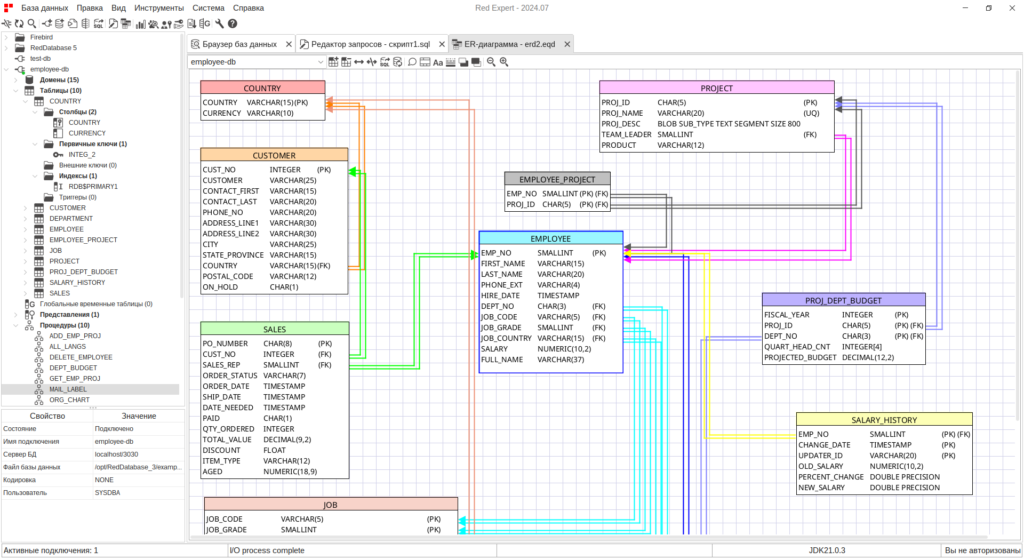
Improved:
- Application interface
- Default themes (light and dark)
- Application toolbar
- Application menu
- Query Editor toolbar
- Query Editor popup menu
- Connections tree
- Settings menu
- About panel
- Procedures, Functions and Jobs editing panel
- Changelog panel (release notes panel)
- Drivers panel
- Feedback panel
- ER-diagram tools
- Color differentiation of tables in the ERD editor
- Reverse engineering
- Text blocks with ability to set background color
- Undo/Redo operation
- Added display of unique fields status (UQ)
- Display table and field comments
- Deleting tables can now be done with DELETE key
- Ability to stretch the size of tables with the mouse
- Ability to switch between color and B&W lines
- Ability to select several tables and move them at the same time
- Fixed scrolling by mouse wheel (SHIFT + wheel scrolling = horizontal scrolling)
- Sorting by tables relationships
- Ability to select the type of lines
- The execute button in the query editor can now:
- Execute only the selected script
- Execute everything if nothing is selected
Added:
- Ability to display column folders, constraints, indexes and triggers for tables in the connections tree
- Panel with basic information about connections
- Ability to create a bug report when an error occurs
- Ability to customize the Query Editor toolbar
Fixed:
- Switching between “Database Statistics” tabs
- Component layout on the column type selection panel
- Displaying domain fields
Removed:
- “Scratch pad” tool
- “Compare Data Types” tool
- “Execute Stored Objects” tool
- Ability to add custom SQL keywords
Download and install the new version.
(6 votes, average: 3.67 out of 5)
Flamerobin 0.9.11 Snapshot released with a few features and fixes .
(3 votes, average: 5.00 out of 5)