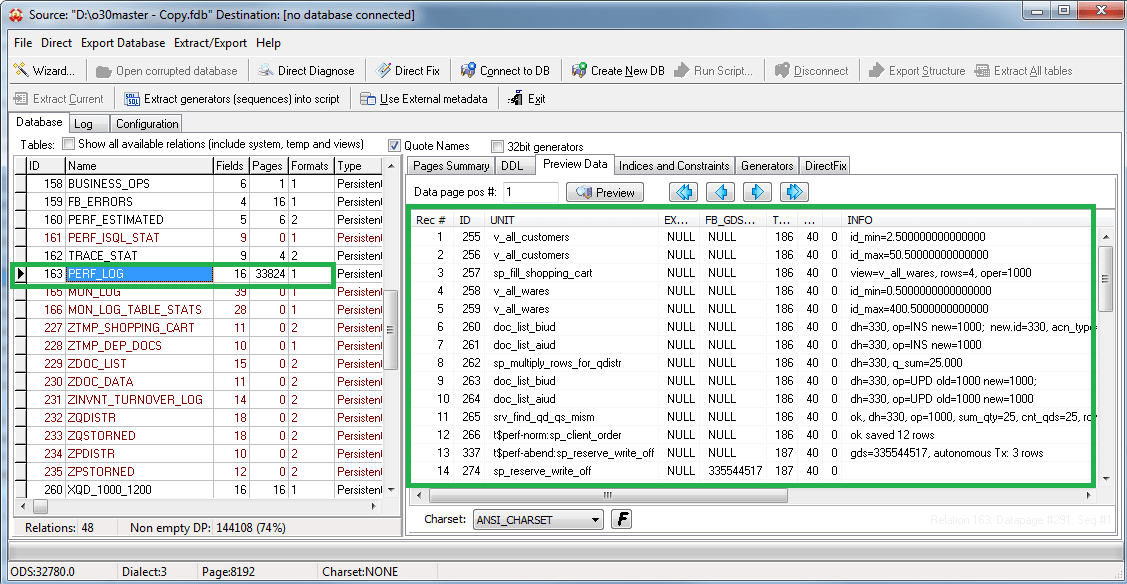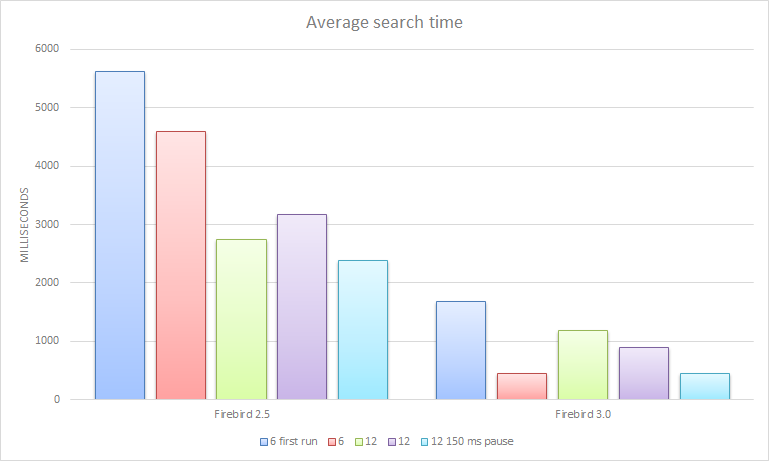
Real life* stress testing a complex server application (or why we really need FireBird 3.0)
Here are the results from a real life stress testing a complex server application

Firebird related news
Here are the results from a real life stress testing a complex server application

Background: The current Firebird automatic installer on El Capitan is no longer working, its format has been
finally deprecated. The installer is currently undergoing a complete re-write to comply with the Flat Package Format. Until this work is completed, you can manually install Firebird using the following method.
New release for node-firebird driver with one bug fix and a few improvements :
Fix a problem with sequential read (#78)
Improvement : Reading of fetched packet
Experimental : Add params to connection (cacheQuery and maxCachedQuery).
when cacheQuery is set to true each query is cached for faster re-use during the connection like in Jaybird.
after the query is cached these steps are saved :
Firebird Project and IBSurgeon invite Firebird administrators and developers to «Firebird Big Databases» seminar (in Russian). Seminar will take place in Moscow, Russia, October 21, 2015.
Main speakers at seminar are Dmitry Yemanov, lead FirebirdSQL developer, Dmitry Kuzmenko, IBSurgeon and Alexey Kovyazin, IBSurgeon.
The seminar will cover topics of Firebird performance optimization and maintenance of big Firebird databases (>500Gb).
Seminars in Europe are planned, but not yet announced, please stay tuned.
More details and registration is at http://ibase.ru/firebirdtour2016.html (in Russian only).
| Upscene Productions is offering a 50% discount on FB TraceManager in October 2015! Simply use the coupon code FBTM-PROMO-50 when placing an order. |
More information on the product is available in the FB TraceManager section on our website, including an edition comparison sheet, webcasts etc.:
http://www.upscene.com/fb_tracemanager/
Thanks for your continued support.
Want an awesome Hacktoberfest tee?
Contribute to one of the many Firebird SQL Github Repositories!
https://github.com/FirebirdSQL/
https://github.com/cincuranet/FirebirdSql.Data.FirebirdClient
https://github.com/hgourvest/node-firebird
and many others https://github.com/search?&q=firebird

dbMigration .NET is a simple, easy and intuitive multiple database migration and sync tool, With it you can easily migrate schema and data between different databases without complicated procedures.
Supported databases: Firebird, PostgreSQL, SQL Server, SQL Azure, LocalDB, MySQL, Oracle, IBM DB2, Informix, HP Vertica, NuoDB, Teradata, Sybase ASE, SQLite, SQLCe, Access, dBase, FoxPro, Excel, ODBC, OLEDB…etc.
For more information please visit http://fishcodelib.com/DBMigration.htm
Free, All-In-One, Portable, and Single executable file.
Here is the guide on installing Firebird 2.5.4 from FreeBSD 10.2 Ports and creating your first test database; also we show you how to install Flamerobin GUI (administration tool) and the PHP driver for it. This was tested on fresh FreeBSD 10.2 x64.
Download a compressed snapshot of the Ports Collection into /var/db/portsnap.
portsnap fetch
Or update it. If you are running Portsnap for the first time, extract the snapshot into /usr/ports:
portsnap extract
If you already have a populated /usr/ports directory and you are just updating, run the following command instead:
portsnap update
Enter firebird server ports directory:
cd /usr/ports/databases/firebird25-server
Compile and install firebird server:
make -DPACKAGE_BUILDING
make install
Enable it by adding
firebird_enable="YES"
in /etc/rc.conf.
Start it with:
/usr/local/etc/rc.d/firebird start
logs and security2.fdb seems to be in /var/db/firebird.
/usr/local/bin/isql-fb
To create a new database:
SQL> create database “tmp/first_database.fdb”;
SQL> connect “/tmp/first_database.fdb” ;
Commit current transaction (y/n)? <– y
Committing.
Database: “/tmp/first_database.fdb”
SQL>
If you want to create a simple table then insert 1-2 rows and select from it; here is one example:
SQL> CREATE TABLE TEST (ID INT NOT NULL PRIMARY KEY, NAME VARCHAR(20));
SQL> show tables;
TEST
SQL> INSERT INTO TEST VALUES (1, ‘John’);
SQL> INSERT INTO TEST VALUES (2, ‘Joe’);
SQL> select * from test;
ID NAME
============ ====================
1 John
2 Joe
To quit the isql-fb console, type quit:
SQL> quit
CON>;
For a good open source GUI admin tool you might check the flamerobin administration tool included in ports repository; it can be installed by a simple:
cd /usr/ports/databases/flamerobin/ && make install clean
Or if you don’t want to wait use pkg-add
pkg-add -r flamerobin
To use firebird with php, you will need the php5 driver:
cd /usr/ports/databases/php5-interbase/ && make install clean
You can choose to compile php with apache support (I have chosen cli, cgi , and apache support); check it if is enabled with:
/usr/local/bin/php -m
Or if you don’t want to wait compile all the php use pkg-add
pkg-add -r php5-interbase
Perl extension DBD::Firebird version 1.21 is released with a few small changes:
Firebird connector for Yii2 framework 0.6 is released .
The list of changes can be consulted in the commits list.